

How to Deposit Money in HH98 Game
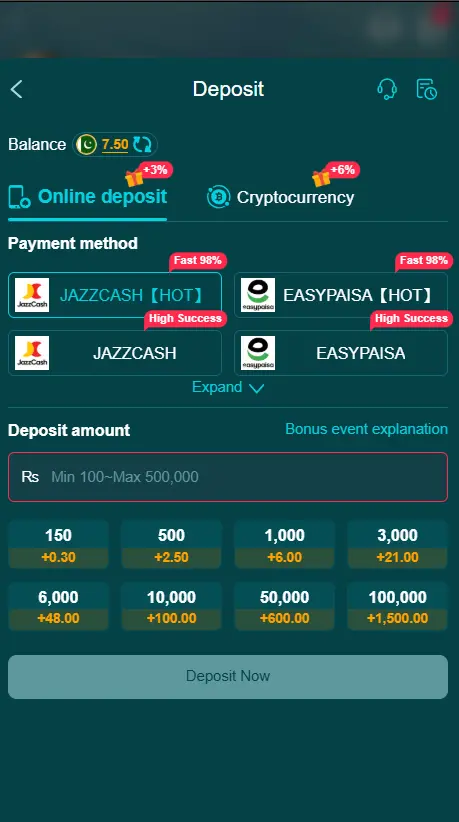
Deposit money into an HH98 Game account is generally done through the Wallet section. Depending on your account and location, available payment options may include JazzCash, Easypaisa, or bank transfer. Payment methods, limits, and processing times can change, so always follow the instructions currently displayed inside your HH98 account.
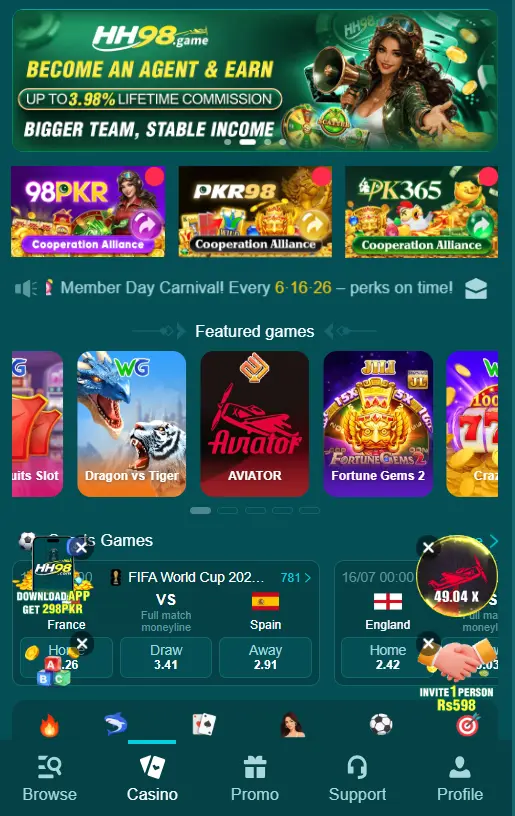
This guide explains the HH98 deposit process in simple English, including payment methods, common problems, security tips, and frequently asked questions.
What Is an HH98 Game Deposit?
An HH98 Game deposit means adding money to your account wallet so you can use the available gaming features. Once the payment is completed successfully, the amount should appear in your wallet balance according to the platform’s processing time.
Before sending money, check the minimum and maximum limits, available payment options, transaction charges, and current payment instructions shown in your account.
How to Add Money to HH98 Game
Adding funds is a simple process when you follow the payment instructions carefully.
1. Open the Website or App
Visit the correct HH98 website or open the application. Always make sure you are using a trusted and up-to-date source.
2. Sign In to Your Account
Enter your registered username and password to access your account dashboard.
3. Go to the Wallet
Open the Wallet, Balance, or Add Funds section. The exact name may differ depending on the version of the platform.
4. Choose a Payment Method
Select one of the payment options currently available to you. Depending on your account, these may include JazzCash, Easypaisa, or bank transfer.
5. Enter the Amount
Type the amount you want to add to your wallet. Check the displayed limits before continuing and only use money you can afford to lose.
6. Verify the Payment Information
Carefully check the recipient number, account details, reference number, and other instructions provided on the payment page.
Do not use payment information from old screenshots, random social-media posts, or unofficial messages.
7. Complete the Transaction
Open your selected payment service and follow the instructions to complete the transfer. Make sure the final amount and recipient details are correct before confirming.
8. Save the Transaction Details
Keep your transaction ID, confirmation message, or receipt. These details can help if the funds are delayed or do not appear in your wallet.
9. Check Your Wallet Balance
Return to your account and check the available balance. If the amount does not appear immediately, wait for the transaction to process instead of sending another payment.
Using JazzCash
If JazzCash is available in your account, select it from the listed payment options. Enter the required amount, review the recipient information, and complete the transfer through your JazzCash account.
Always verify the details before confirming the transaction.
Using Easypaisa
Easypaisa may also be available as a local payment option. Select it from the Wallet section and follow the instructions displayed on your screen.
After completing the transfer, keep the Easypaisa confirmation message until your wallet balance has been updated.
Bank Transfer Option
Bank transfer may be available for some users. Since payment options can change, use only the bank information currently displayed inside your account. Before sending money, carefully compare the account number, recipient name, and other required details.
How Long Does It Take for the Money to Arrive?
Processing time can depend on the payment provider, network conditions, account verification, and platform processing. Some transactions may appear within a short period, while others can take longer.
There is no need to repeat the payment while the first transaction is still pending.If the money has been sent successfully but your balance has not changed, check the transaction status and keep your payment receipt.
What to Do When the Balance Is Not Updated
If your funds are missing from the wallet, follow these steps:
- Confirm that the payment was completed successfully.
- Check the amount and transaction reference.
- Give the payment some time to process.
- Check your wallet balance again.
- Look for any maintenance or service notice.
- Contact the platform’s current support channel if the issue continues.
Avoid sending another payment until the status of the first transaction is clear. This can help prevent duplicate payments and unnecessary complications.
Common Payment Problems
Incorrect Account Details
Entering the wrong recipient number or bank information can cause payment problems. Always review the details before confirming.
Processing Delay
A transaction may take longer because of network issues, payment-provider delays, or platform maintenance.
Incorrect Amount
Make sure the amount you send matches the amount entered on the payment page and stays within the current limits.
Wallet Balance Not Updated
Sometimes the payment is completed before the account balance refreshes. Check the transaction status and contact support if the issue remains unresolved.
Security Tips for HH98 Users
Keep your financial and account information private when making online transactions.
- Never share your OTP, PIN, password, or verification code.
- Use only payment details shown through a trusted account source.
- Avoid sending money to numbers provided by unknown people.
- Keep screenshots or receipts of completed transactions.
- Check recipient details before confirming.
- Do not reuse outdated payment information.
- Set a personal spending limit before using real money.
- Only use online gaming services where permitted by applicable laws.
Why Accurate Payment Details Matter
Entering correct payment information helps reduce avoidable transaction problems. A wrong mobile number, bank account, reference code, or amount can make it harder to identify a payment.
For this reason, review every detail before completing your HH98 Game deposit.
Final Thoughts
The basic HH98 Game deposit process involves logging in, opening the wallet, selecting an available payment method, entering the amount, completing the payment, and checking the updated balance. JazzCash, Easypaisa, and bank transfer are among the payment methods reported by current HH98-related guides, but the options available to you may differ.
For trustworthy information, prioritize the instructions displayed inside your account and avoid making claims about guaranteed profits, instant processing, or guaranteed earnings. Google’s guidance emphasizes useful, reliable, people-first content rather than content created primarily to manipulate search rankings.
Frequently Asked Questions
How can I add funds to my account?
Open your account, go to the Wallet section, select an available payment option, enter the amount, and follow the instructions shown on the screen.
Which payment methods are available?
Options may include Easypaisa, JazzCash, bank transfer, or other local services. Available methods can vary by account and location.
How long does it take for funds to appear?
The processing time depends on the payment provider and platform. Some transactions may be completed quickly, while others can take longer.
What should I do if my balance is not updated?
Check the transaction status and keep your payment receipt or reference number. If the balance remains unchanged, contact support with your transaction details.
Is there a minimum amount required?
Minimum and maximum limits can vary by payment method. Check the current limit shown in your HH98 Game account before proceeding.
Can I use Easypaisa or JazzCash?
Yes, if either option is currently available in your HH98 Game Wallet. Follow the instructions provided on the payment screen.
Should I share my OTP or PIN?
No. Never share your OTP, PIN, password, or other private security details with anyone.
Why should I keep the payment receipt?
The receipt contains useful information such as the transaction ID, amount, and time. It can help resolve delayed or missing payment issues.
What if the payment details have changed?
Always use the latest details shown in your account. Avoid sending money to numbers or accounts found in old screenshots or unofficial messages.